
A Robust WordPress Plugin
A plugin to find Indian bank IFSC codes by selecting Bank Name, State, City, and Branch Address or by entering an IFSC Code, with CSV upload in plugin's admin page.
Test Demo
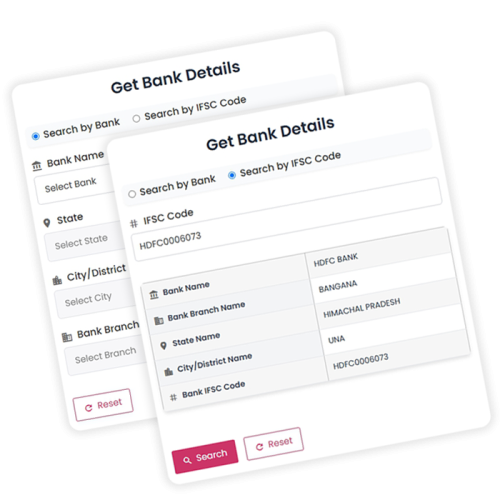
Get Bank Details
| account_balance Bank Name | |
|---|---|
| business Bank Branch Name | |
| location_on State Name | |
| location_city City/District Name | |
| tag Bank IFSC Code |
| account_balance Bank Name | |
|---|---|
| business Bank Branch Name | |
| location_on State Name | |
| location_city City/District Name | |
| tag Bank IFSC Code |
Features:
- Search IFSC codes by selecting bank name, state, city, and branch address. Search bank by entering IFSC code.
- Search bank details by entering an IFSC code.
- Admin CSV upload functionality to easily import bank data.
- Responsive and user-friendly design.
- Lightweight and secure, with proper sanitization and validation.
Minimum Requirements:
- WordPress version : 5.0 or higher.
- PHP Version: 7.4 or higher (PHP 8.1 recommended).
- MySQL Version: 8.0 or higher OR MariaDB Version: 10.5 or higher.
- Web Server: Apache or Nginx with HTTPS support.
- Disk Space: 100 MB minimum.
- PHP Memory Limit: 128 MB.
Description:
The Bank IFSC Code Finder plugin allows users to search for IFSC codes of Indian banks in two ways:
- Search by Bank: Select a Bank Name, State, City, and Branch Address from dropdowns to find the corresponding IFSC code and other bank details.
- Search by IFSC Code: Enter an IFSC code to retrieve the associated bank name, branch address, city, state, and other details.
Admins can upload a CSV file containing bank data (Bank Name, IFSC Code, Branch Address, City, State, etc.) to populate the plugin's database.
(Demo bank data CSV available in plugin folder.
The plugin uses a shortcode to display the search form on any page or post.
Installation:
- Install and activate the plugin directly through the WordPress plugins screen.
- Navigate to the "Bank IFSC Finder" menu in the WordPress admin panel.
- Upload a CSV file containing bank data (columns: Bank Name, IFSC Code, Branch Address, City, State, etc.). (Demo bank data CSV available in plugin folder.)
- Map the CSV columns to the plugin fields and save.
- Add the shortcode
[bank_ifsc_finder]to a page or post to display the search form.
- Instant Search
- Responsive Design
- Full Admin Control
- Smart Filter
- CSV Upload
- One-Click Import
- Auto IFSC Lookup
- 1 Click Record Remove
Usage Instructions
For Admins:
- Go to the “Bank IFSC Finder” menu in the WordPress admin panel.
-
Prepare a CSV file with the following columns: Bank Name, IFSC Code, Branch Address, City, State (and any additional fields like MICR Code or ZIP Code if applicable).
(Don’t worry! Demo CSV file included in plugin folder.) - Example row: State Bank of India, SBIN0001234, 123 MG Road, Mumbai, MAHARASHTRA, 400001
- Upload the CSV file and map the columns to the plugin fields.
- Save the data to populate the plugin’s database.
DONE..
For Users:
Visit the page where the tool is available.
- Search by Bank: Select a Bank Name, State, City, and Branch Address from the dropdowns. The plugin will display a table with the IFSC code and other bank details. Use the “Reset” button to clear the form.
-
Search by IFSC Code:
Select the “Search by IFSC Code” option.
Enter a valid IFSC code (e.g., SBIN0001234).
Click “Search” to view the bank details in a table.
Use the “Reset” button to clear the form.
